Review CBCT in panoramic and cross-sectional views.
A Windows DICOM viewer for dentists. Trace the dental arch, move along the panorama, and measure lengths and regions on cross-sections. Your scans stay on your computer.
For image review. Implant planning and surgical guide design are outside its scope.
How it works
Open the CBCT
Choose the axial series. Every series is listed with its plane, so the right one is easy to find.
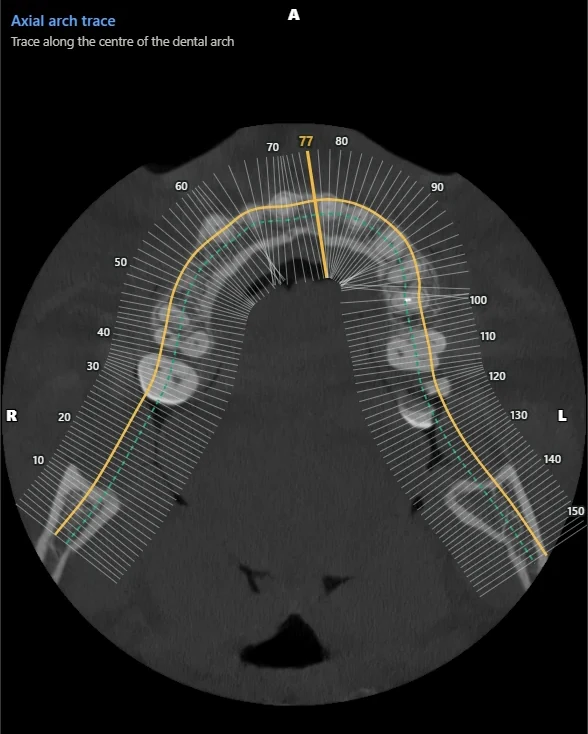
Trace the arch
Click along the arch on an axial slice, then adjust the curve until it follows the teeth.
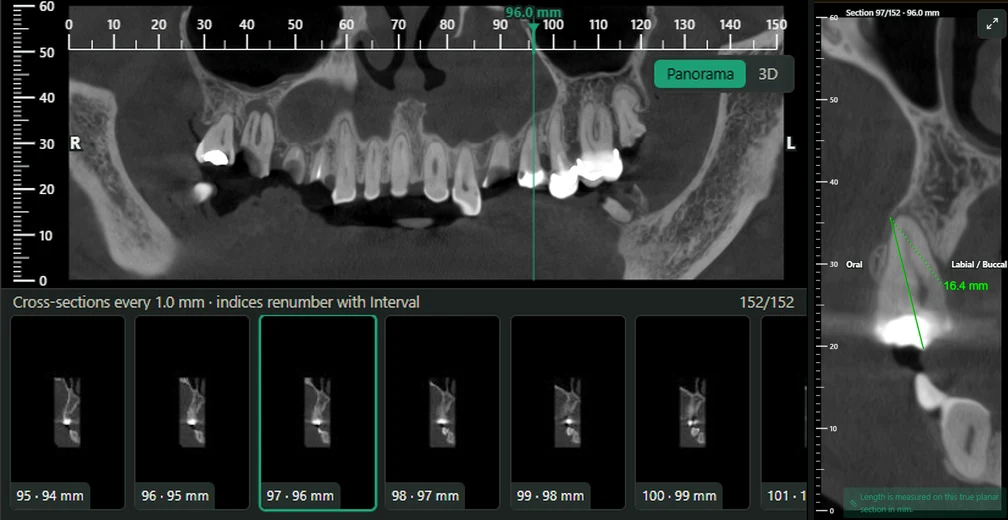
Scroll and measure
Scroll the panorama, pick a cross-section, and measure lengths and rectangular regions on it.
What it is, and what it isn't
It is
- A viewer for panoramic and cross-sectional review of CBCT.
- Length and region measurements on every cross-section.
- Local. Your scans stay on your computer.
It isn't
- Implant planning software. It doesn't place implants or suggest sizes.
- A tool for designing surgical guides.
- A panorama for measuring. Measure on the cross-sections, where distances are true to scale.
- An interpreter. RadSpection shows and measures; the reading is yours.
Dental is included in every plan.
Try it free for 7 days, on your own scans.